

agency workload management: how small teams run it.
workload management for an agency is one shared view of every task the team owes, tagged by client, category, who's on it, status and time, so nobody loses a job and nobody blocks on a missing hand-off. for a small agency, the point is the sharing: one list, one truth, every editor looking at the same rows.
what to track on every task.
- client (or scope). who the work belongs to. in-house teams can swap this for a programme name.
- category. the kind of work, matched to how your team is organised. for an agency: strategy, creative, web, marketing, data, crm. for an in-house team: campaigns, content, lifecycle, website.
- job. the piece of work, short: "homepage hero", "may newsletter", "tracking fix".
- action. what still needs doing, in a sentence. not a status.
- status. four is enough: pending, in progress, on hold, blocked. any more and people stop updating.
- time. estimated or logged, in blocks a human can pick (15 min, 30 min, 1 hr, 2 hr), not free-text decimals.
- raised date. when it landed. tells you what's been sitting.
- notes. freeform, one paragraph. anything longer belongs in the brief, not the tracker.
eight fields, not twenty. a tracker people actually update beats a tracker that captures everything and gets abandoned by week three.
three ways teams run it.
no small agency should build its own project management framework. there are three honest shapes, each the right answer for a different team.
| spreadsheet | generic saas | bespoke tool | |
|---|---|---|---|
| fast to start | today | today | a week or two |
| fits your categories | you build it | you adapt to theirs | yes, from day one |
| more than three editors at once | breaks (version conflicts) | fine | fine |
| filters and totals that stay honest | brittle | strong | strong, scoped to your data |
| price pattern | free | monthly, per seat, forever | one build fee, then hosting |
| data lives | your drive | the vendor's servers | your server |
| dependencies and automations | no | yes | only if built in |
where each one breaks.
spreadsheets are fine until the third editor shows up. the grid becomes a war of saved versions, the formulas start lying when a row is deleted, and the person who built it becomes the person who maintains it forever. a ceiling of two clients and two editors is realistic; everything past that leaks.
generic saas tools (monday, asana, teamwork, clickup, productive, function point) do a lot. the trade-off is that your team's shape of work bends around the tool's model. every tool has its own idea of what a project, a task, a time entry and a client are, and if your idea is slightly different you spend weeks forcing it in, then pay monthly per seat forever. for a predictable, workflow-driven team of fifteen plus, worth it. for a five-person agency juggling retainers, usually not.
a bespoke tool starts on your team's shape: the categories you already use, the statuses that already make sense, the time blocks people actually pick. the trade-off is up-front cost and no dependencies, approvals or automated workflows unless they're built in. once it's running there's no monthly seat fee and the data lives on a server you control.
how to choose for your team.
four questions:
- how many people will edit it in the same hour? one or two: a spreadsheet lasts a long time. three or more: time for a real tool.
- how different is your team's shape from the big tools' default? if your categories match monday's groups and your statuses match asana's, use them. if you've got six services with thirty sub-categories, you'll adapt the tool forever.
- will you pay forever, or once? saas is a monthly line item that grows with headcount. a bespoke tool is one build fee, then hosting. over three years, with five seats, the saas bill is usually more than the one-off.
- where does the data need to live? if the answer involves a specific country, a specific provider, or "not a us saas", that's a bespoke-tool signal.
most small agencies start on a spreadsheet, outgrow it around year two, try monday or asana, adapt for three months, and either stay (paying forever to use something that almost fits) or commission a bespoke tool. the choice gets easier when you know in advance which of those two endings fits your team's shape.
a worked example.
ink.'s own workload manager runs on the same ideas. eight fields per task, six categories across the row with their own colour, four statuses, time in fixed blocks. two tabs, one for to-do and one for completed, so finished work doesn't clutter the live list but every hour stays on the record. a stats bar at the top totals the time, filtered by client or category when you set a filter.
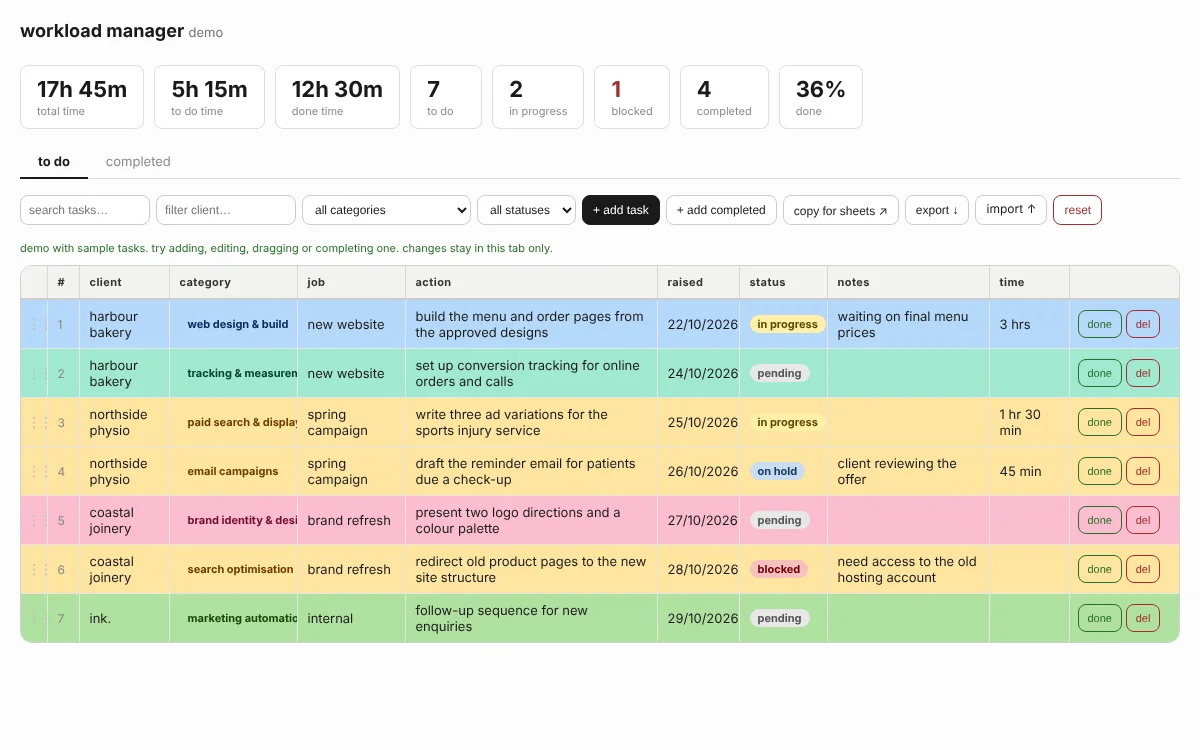
the live version syncs to a shared database so every editor sees the same list across every device, and backs itself up as a json file on export. a client version of the tool is set up with that client's own brand, categories and tools in place of ink.'s six services, so the list reads the way their team already thinks.
questions.
what is workload management for an agency?
one shared view of every task the team owes, tagged by client, category, who's on it, status and time, so nobody loses a job and nobody blocks on a missing hand-off.
is a spreadsheet enough?
for one or two clients and one or two editors, yes. it starts to break when more than three people edit at once or when you need filters and totals you can trust.
when does generic saas work best?
when your team's shape of work matches the tool's: predictable workflows, dependencies that need enforcing, more than ten editors. jira, asana and monday are built for that.
when is a bespoke tool worth the build?
when the team's categories, statuses and time blocks don't match any generic tool, when the monthly seat fees are growing faster than the team is, and when the data needs to live on your own server.
what should the live version do that the demo doesn't?
save to a shared database so every editor sees the same list across every device, back up every night, keep an audit of who changed what, and let you export the lot on demand.
related.
make your mark.
if a bespoke workload manager fits your team, we'd like to show you one. free initial consultation.
get in touch.call christian.0434 ••• •••